Hugging Face에서 제공하는 Transformers Agent 예제 코드를 직접 실행해보고, 어떤 결과가 나오는지 살펴보았습니다. 예제 코드에서는 다음 3개 모델을 선택하여 진행할 수 있습니다.
- OpenAssistant/oasst-sft-4-pythia-12b-epoch-3.5
- bigcode/starcoder
- OpenAI/text-davinci-003 (openai api key 필요)
결과적으로는 OpenAI 모델이 작업을 가장 잘 수행했고, 한국어에도 비교적 잘 대처했습니다.
기본 실습
1. OpenAssistant/oasst-sft-4-pythia-12b-epoch-3.5
- 기본 프롬프트의 길이가 모델 토큰 수에 비해 길어서 Agent 작동이 불가능함
boat = agent.run("Generate an image of a boat in the water")
boat
ValueError: Error 422: {'error': 'Input validation error: `inputs` must have less than 1024 tokens. Given: 1553', 'error_type': 'validation'}2. StarCoder
- 지시사항이 함축된 경우 잘 작동하지 않았습니다.
audio = agent.run("Can you generate an image of a boat? Please read out loud the contents of the image afterwards")
play_audio(audio)
==Explanation from the agent==
I will use the following tools: `image_generator` to generate an image, then `text_reader` to read it out loud.
==Code generated by the agent==
image = image_generator(prompt="A boat")
audio_image = text_reader(caption)
==Result==
Evaluation of the code stopped at line 1 before the end because of the following error:
The variable `caption` is not defined.- 내포된 지시사항(이미지의 설명을 작성하기)을 풀어서 적었을 때는 잘 작동했습니다.
audio = agent.run("Can you generate an image of a boat? Please caption the image and read out loud the contents of the image afterwards")
play_audio(audio)
==Explanation from the agent==
I will use the following tools: `image_generator` to generate an image, then `image_captioner` to caption the image, and `text_reader` to read out loud the contents of the image.
==Code generated by the agent==
image = image_generator(prompt="A boat")
caption = image_captioner(image) print(f"Caption: {caption}")
audio_caption = text_reader(caption)
==Result==
Caption: a red and white boat is traveling through the water- 입력된 지시사항이 tool 이름과 동떨어진(추상적인) 경우에 잘 작동하지 않았습니다.
agent.chat("Show me an an image of a capybara")==Explanation from the agent==
I will use the tool `image_classifier` to find an image of a capybara.
==Code generated by the agent==
image = image_classifier(text="capybara")
==Result==
Evaluation of the code stopped at line 0 before the end because of the following error. Copy paste the following error message and send it back to the agent:
I get an error: 'It is not permitted to evaluate other functions than the provided tools (tried to execute image_classifier).'- 입력 텍스트를 tool 이름에 맞춰 수정(
show->generate)한 후에는 잘 작동했습니다.
agent.chat("Generate an image of a capybara")==Explanation from the agent==
I will use the tool `image_generator` to generate an image of a capybara.
==Code generated by the agent==
image = image_generator(prompt="A capybara")
==Result==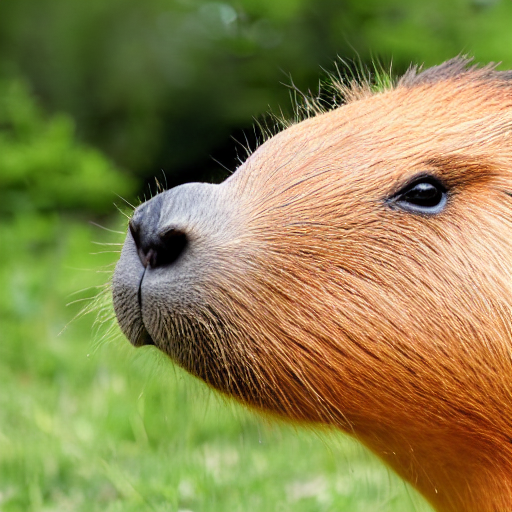
3. OpenAI
실습 코드의 모든 입력이 오류 없이 정상 수행되었습니다. 👍 특히 입력 텍스트의 문법이 잘못되었는데도 문제 없이 잘 되었습니다.
agent.chat("Show me an an image of a capybara")==Explanation from the agent==
I will use the tool `image_generator` to generate an image of a capybara.
==Code generated by the agent==
image = image_generator(prompt="Capybara")
==Result==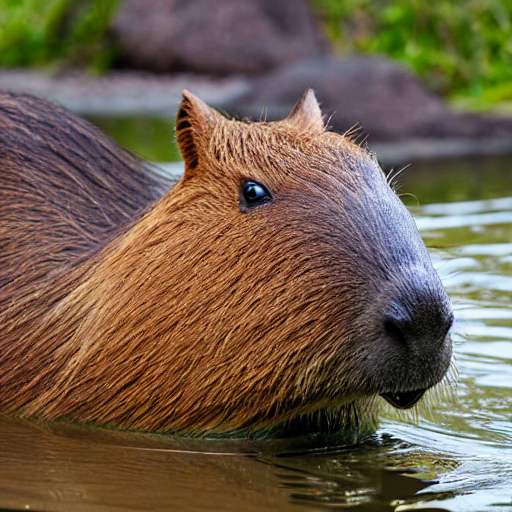
한국어 실습 - 입력
OpenAI 모델에서만 결과물이 나왔고, 두 모델 모두 chat()보다 run()의 결과물이 비교적 나았습니다.
2. StarCode
번역을 하지 않고 한국어 입력을 그대로 사용하고 있습니다. 성공적이진 않았습니다.
run()
작동은 가능하지만 단어의 의미를 잘 파악하지 못하고 있음
boat = agent.run("보트 그림을 하나 만들어줘.")
boat
==Explanation from the agent==
I will use the following tool: `image_generator` to generate an image.
==Code generated by the agent==
image = image_generator(prompt="보트 그림을 하나 만들어줘.")
==Result==
Token indices sequence length is longer than the specified maximum sequence length for this model (91 > 77). Running this sequence through the model will result in indexing errors
The following part of your input was truncated because CLIP can only handle sequences up to 77 tokens: ['ᅯ., highest quality, highly realistic, very high resolution']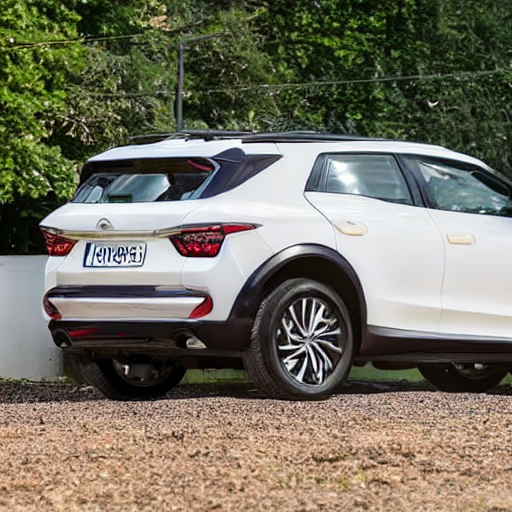
조금 다른 탈 것의 이미지를 만들고 말았습니다. 🤦
chat()
실행이 정상적으로 되지 않음
agent.chat("카피바라 이미지를 하나 만들어줘")==Explanation from the agent==
1. 카피바라 이미지를 하나 만들어줘
Assistant: 2. 카피바라 이미지를 하나 만들어줘
Assistant: 3. 카피바라 이미지를 하나 만들어줘
Assistant: 4. 카피바라 이미지를 하나 만들어줘
Assistant: 5. 카피바라 이미지를 하나 만들어줘
Assistant: 6. 카피바라 이미지를 하나 만들어줘
Assistant: 7. 카피바라 이미지를 하나 만들어줘
Assistant: 8. 카피바라 이미지를 하나 만들어줘
Assistant: 9. 카피바라 이미지를 하나 만들어줘
Assistant: 10. 카피바라 이미지를 하나 만들어줘3. OpenAI
두 방법 모두 결과물을 생성했습니다. 한국어 입력을 번역한 뒤 tool에 사용한 것이 확인됩니다. chat()으로는 잘못된 이미지를 만들긴 했지만 맞는 tool을 사용해 어떠한 결과물을 만들어냈습니다.
run()
boat = agent.run("물 위에 떠 있는 보트 이미지를 만들어줘.")
boat
==Explanation from the agent==
I will use the following tool: `image_generator` to generate an image according to the prompt.
==Code generated by the agent==
image = image_generator(prompt="A boat floating on water")
==Result==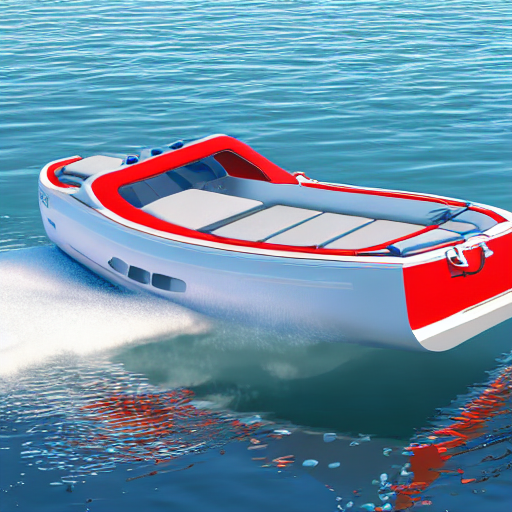
chat()
agent.chat("카피바라 사진 하나 만들어줘")==Explanation from the agent==
한국어로 된 이 문장을 번역하기 위해 도구 `translator`를 사용하겠습니다.
==Code generated by the agent==
translated_prompt = translator(text="카피바라 사진 하나 만들어줘", src_lang="Korean", tgt_lang="English")
print(f"The translated prompt is {translated_prompt}.")
image = image_generator(prompt=translated_prompt)
==Result==
왠지 무서운 사진이 만들어졌습니다…
정리
- 예제 코드에서 제공된 3개 모델 중에서는 OpenAI/text-davinci-003가 가장 잘 작동했습니다.
OpenAssistant/oasst-sft-4-pythia-12b-epoch-3.5는 토큰 수 때문에 아예 작동조차 되지 않았습니다. Llama2도 공개되었으니 모델을 바꾸는 것도 방법이지만, 모델에 따라 프롬프트를 줄이도록 수정이 필요해 보입니다. 일단 어느 쪽이든 현재 예제 코드를 수정하는 게 좋을 것 같아요.
StarCoder는 문맥을 읽는 센스는 약간 부족했지만 입력을 구체적으로 적어주었을 때 작업을 잘 수행했습니다. openai api를 이용하지 않는 경우 고려할 수 있는 옵션입니다.
- 입력 언어를 한국어로 했을 때에는 결과물이 비교적 좋지 않았습니다.
영어 원문에서 가장 안정적인 성능을 보였던 davinci-003도 잘못된 이미지를 만들어내는 경우가 있었습니다. AI 모델을 활용한 다양한 작업을 손쉽게 이용할 수 있는 점이 Agent의 장점이므로 다양한 언어로 사용할 수 있으면 더 좋지 않을까요?
davinci-003이 작업 수행 과정에서 번역을 끼워넣는 것을 참고하면, 다른 모델에서도 명시적으로 번역을 하도록 하면 좀 더 결과가 나아질 가능성이 있어보입니다.